
The RaySafe X2 is a versatile meter with various sensors. Several have already been mentioned in previous blog posts. In this blog, I will tell you more about the Light sensor.

The most common measurement performed with a Light sensor is the DICOM GSDF (Digital Imaging and Communication in Medicine Grayscale Standard Display Function). RaySafe also provides an Excel template to perform this measurement.
Click here for the RaySafe website. Then go to the “Documents & Downloads” tab. Under the heading “Excel templates” you will find the file.
Parameters
The Light sensor measures in two units with the following range:
- 0.01–10,000 cd/m², luminance
- 0.1–100,000 lux, illuminance
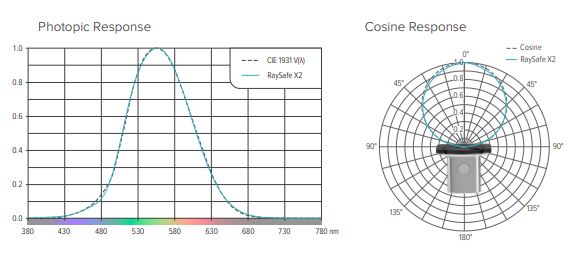
The deviation from the human eye is less than 3%. The cosine deviation is also less than 3%. See the image below for a schematic overview.
In practice
How does the Light sensor work in practice? To measure in luminance: turn the wheel of the sensor to the screen icon. Then place the connected sensor on the screen.

To perform the measurement in illuminance, turn the wheel to the lamp icon. Then point the opening of the light distributor to the point you want to measure.
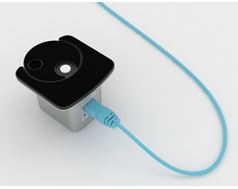
If you want to restore the Light sensor to the zero point after measuring, turn the wheel to the zero point. Restoring the zero point takes about 10 seconds.
Once you have finished measuring, it is important to store the sensor correctly. Turn the wheel to the zero point or to the lamp icon. This ensures that dirt does not directly enter the sensor.
Would you like to know more about the RaySafe X2 and all sensors? Please contact us.
